Everything You Need to Know About Website Cookies
Everything You Need to Know About Website Cookies
In the digital age of 2025, website cookies are everywhere, quietly shaping your online experience. But what exactly are they? Cookies are small text files that websites place on your device via your browser to store information about your visit. They remember preferences, track behavior, and enable features like staying logged in. Not to be confused with tasty treats, these "HTTP cookies" (named after "magic cookies" in programming) are essential for modern web functionality, but they raise privacy concerns too.
How Do Cookies Work?
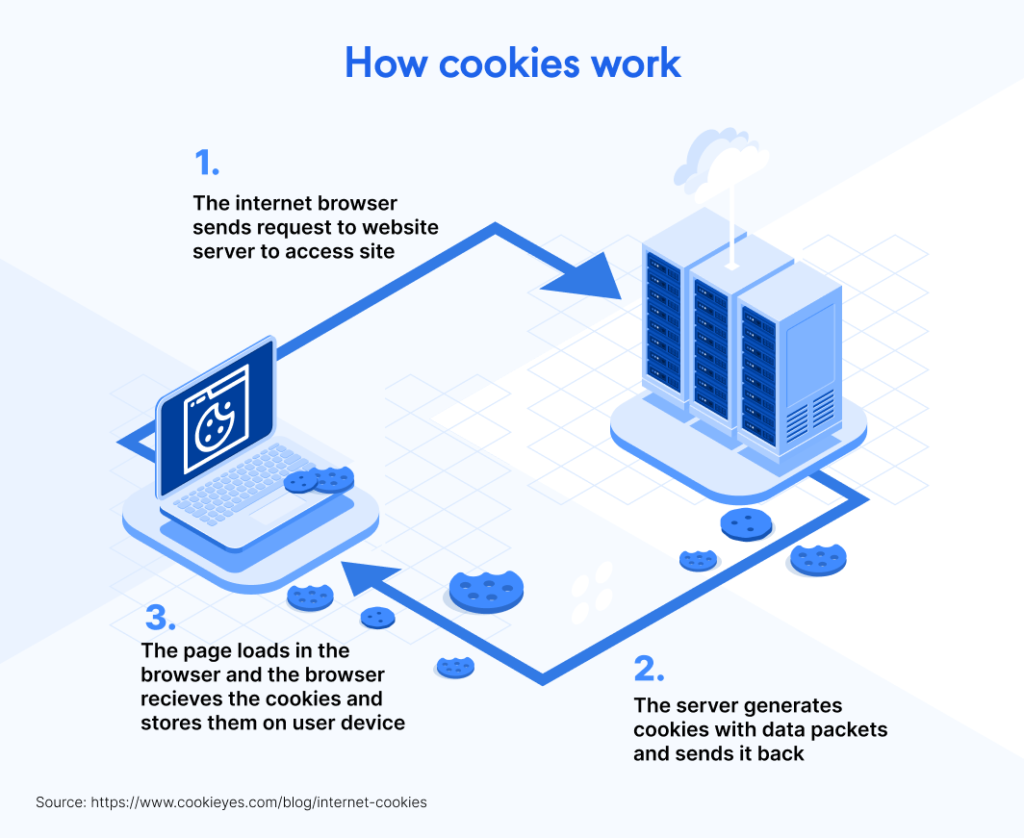
When you visit a site, the server sends a cookie to your browser, which stores it locally. On return visits, your browser sends it back, allowing the site to recognize you. This happens seamlessly—think auto-filled forms or personalized ads. Cookies contain data like IDs, timestamps, and preferences, but not viruses (though malicious sites can misuse them).
Types of Cookies
- Session Cookies: Temporary, deleted when you close the browser; great for shopping carts.
- Persistent Cookies: Stay until expired or deleted; remember logins across sessions.
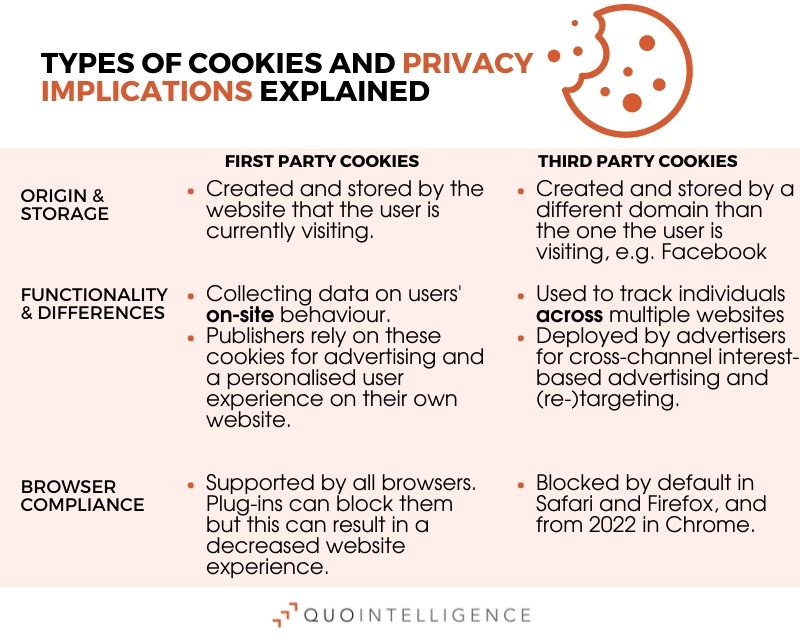
- First-Party Cookies: Set by the site you're visiting; essential for functionality.
- Third-Party Cookies: From external domains (e.g., ads, analytics); track across sites but are being phased out.Other types include secure (HTTPS only), HTTP-only (not accessible via JavaScript), and supercookies (harder to delete).
Benefits and Uses
Cookies enhance user experience: They enable personalization (e.g., language settings), analytics for site improvements, and targeted marketing. For e-commerce, they maintain carts; for media, they resume videos. Without them, the web would feel clunky.
Risks and Privacy Concerns
The downside? Tracking: Third-party cookies build profiles for ads, potentially invading privacy. Risks include data breaches or supercookie persistence. Regulations like GDPR and CCPA mandate consent banners. In 2025, Google's delayed third-party cookie phase-out shifts focus to alternatives like Privacy Sandbox.
How to Manage Cookies
Control them via browser settings: In Chrome, go to Settings > Privacy > Cookies to block or clear them. Use incognito mode for cookieless sessions, or extensions like uBlock Origin. Always review site policies.
Cookies aren't inherently bad—they're tools. Understand them to browse smarter. Questions? Dive deeper into privacy laws for compliance.
/images/2025/08/22/which-cookies-should-you-accept.png)


Comments
Post a Comment