What Is a VPN and How Can You Set It Up?
What Is a VPN and How Can You Set It Up?
Hey there, in this digital age where privacy feels like a luxury, you've probably heard of VPNs buzzing around. But what exactly is a VPN? Short for Virtual Private Network, it's like a secure tunnel for your internet connection. It encrypts your data, hides your IP address, and lets you browse as if you're in another location. This shields you from hackers on public Wi-Fi, dodges geo-blocks for streaming, and keeps ISPs from snooping on your habits.
Why bother? Well, with cyber threats rising in 2025, a VPN boosts privacy and security. Imagine accessing Netflix shows from anywhere or safely banking online—it's a game-changer for travelers too.
Setting one up is easier than you think. Here's a step-by-step guide:
- Choose a Provider: Go for reputable ones like ExpressVPN or NordVPN (paid for better speed and no logs). Avoid free ones—they might sell your data.
- Download the App: Head to their website, pick your device (Windows, Mac, Android, iOS), and download the installer.
- Install and Sign Up: Run the setup, create an account, and log in. Most offer trials or money-back guarantees.
- Connect: Open the app, select a server location, and hit connect. Boom—you're protected!
For manual setup without an app (e.g., on Windows): Go to Settings > Network & Internet > VPN > Add a VPN connection, enter details from your provider. On Android: Settings > Network & Internet > Advanced > VPN.
Pro tip: Test for leaks on sites like ipleak.net after connecting. And remember, while VPNs are legal most places, use them ethically.
As someone who's set up a few, it's straightforward and worth it for peace of mind. Ready to try? What's your main reason for wanting a VPN?
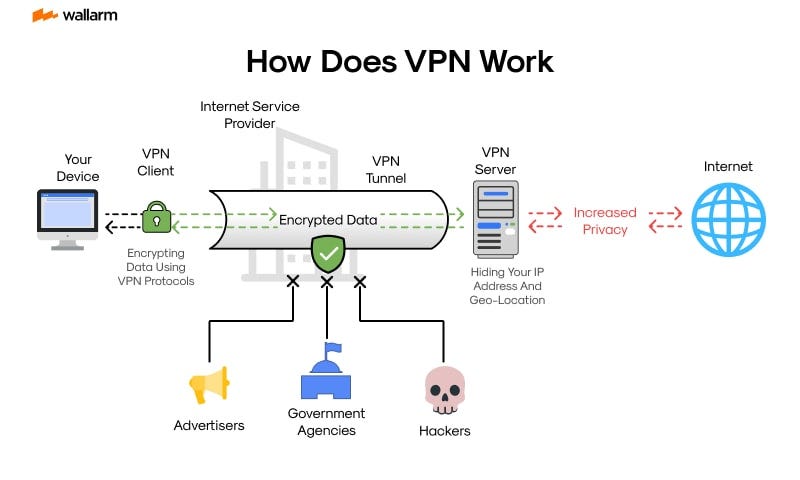
This visual breaks down the VPN process simply.

Handy steps for Windows users.


Comments
Post a Comment